How to Create an AI Agent Without Coding: Easy Guide for Businesses
If you’ve ever wished you could clone yourself just to answer calls, follow up with leads, or deal with that one customer who always calls during lunch. Good news: you don’t need a clone. You just need an AI call agent. And no, you don’t need to know how to code, build neural networks, or whisper sweet nothings to a server room.
Today’s no-code tools make it genuinely easy for businesses to set up an AI agent that can handle calls, assist customers, and take repetitive tasks off your plate. In this guide, we’ll walk through how to create an AI agent using Betty AI, step by step, minus the tech headache.
Let’s get your “always-on, never-hungry, never-takes-a-leave” teammate up and running.
Why Businesses Need No-Code AI Agents Today
Running a business often feels like juggling flaming swords while riding a unicycle. There’s always something that demands your attention, and sometimes you just wish someone else could handle the calls, follow-ups, or routine questions. That’s where no-code AI agents come in: they step in without you needing a degree in computer science.
- Handle repetitive calls without burnout: Instead of answering the same questions about hours, pricing, or order status, an AI agent takes over. Your team can finally focus on work that actually needs human brains.
- Qualify leads automatically: Not every inquiry is worth a full sales pitch, and chasing the wrong leads wastes time. An AI agent can screen prospects, saving your team from awkward “we’re not a fit” calls.
- Be available 24/7: Customers don’t work 9–5, and neither do their problems. An AI agent answers calls, schedules appointments, or provides info even while you’re asleep, at lunch, or binge-watching your favorite show.
- Integrate without tech headaches: Traditional automation often requires developers, endless meetings, and confusing APIs. No-code AI agents plug into your existing tools seamlessly, so you skip the headache and still get results.
- Scale without hiring dozens of new employees: Growing businesses often hit a point where customer inquiries multiply faster than your team can handle. An AI agent handles the volume without you needing to expand headcount overnight.
No-code AI agents aren’t a futuristic luxury; they’re a practical tool that saves time, reduces stress, and makes your team look like superheroes without needing superpowers.
Before You Start: What You Need To Know When Creating an AI Agent
Setting up an AI agent isn’t magic; it’s more like setting up a new teammate who doesn’t drink coffee, doesn’t gossip, but does need clear instructions. Before you dive in, a little planning will save you from calls going off-script or leads slipping through the cracks.
- Define your agent’s purpose clearly: Is your AI handling customer support, sales calls, appointment scheduling, or all of the above? Knowing its main role prevents confusion and keeps every call on track.
- Map out your processes: Think of it like giving your agent a cheat sheet. Outlining workflows, FAQs, and decision points ensures Betty knows when to escalate, when to follow up, and when to close a conversation.
- Decide on the tone and voice: Your AI needs to sound like your brand, not a monotone robot, or worse, like someone who just woke up. Choosing a consistent voice makes every interaction feel intentional and professional.
- Identify integrations early: Consider the tools your AI will need to connect with, like CRMs, calendars, or messaging apps. Prepping this in advance makes setup smoother and prevents tech headaches later.
- Set measurable goals: Decide what success looks like: more qualified leads, faster response times, or fewer dropped calls. Clear goals help you monitor performance and make improvements without guesswork.
Planning before you build turns a “maybe this will work” AI into a reliable team member that actually makes your life easier. Think of it as the blueprint before the heavy lifting. Your future self will thank you.
Steps on How to Create an AI Agent Without Coding
Creating an AI agent might sound like you need a secret lab, a PhD, or at least some very convincing hacker vibes. But thanks to no-code tools like Betty AI, you don’t. In reality, it’s more like onboarding a new teammate: a few decisions up front, a little setup, and then they’re ready to handle the calls you don’t want to take.
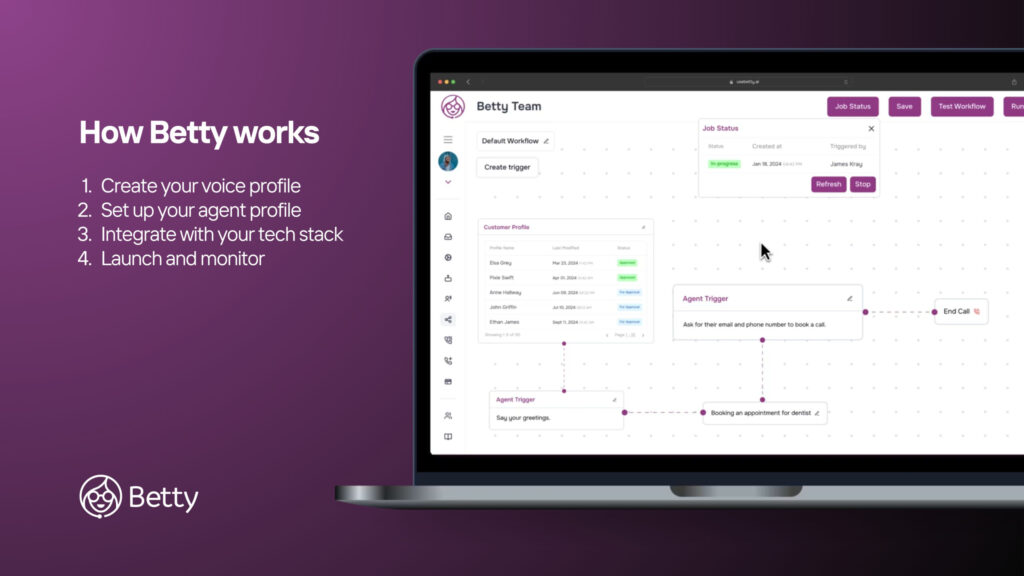
Step 1: Create Your Voice Profile
- Pick a voice that matches your brand: Your AI shouldn’t sound like it’s reading from a robot manual unless that’s actually your vibe. Friendly, professional, casual, or formal – choose a tone that fits the way your customers already talk to your team.
- Adjust style and pacing: Speed matters. Too fast and customers can’t follow; too slow and they hang up. Fine-tuning these details ensures every conversation feels natural and human-like.
Step 2: Set Up Your Agent Profile
- Define the agent’s role: Sales, support, appointment scheduling – you decide. Clear roles prevent confusion and ensure your AI knows exactly when to answer, escalate, or follow up.
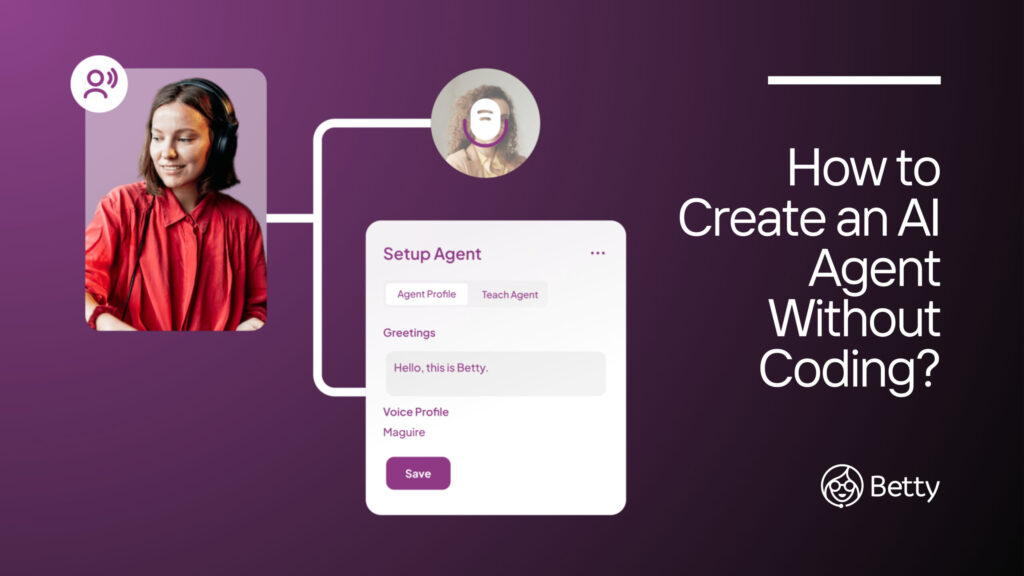
- Customize instructions: Feed your agent the information it needs: FAQs, call flows, and key responses. Think of it as giving Betty a playbook so every call runs smoothly, even if you’re busy chasing other tasks.
Step 3: Integrate With Your Tech Stack
- Connect without coding headaches: Betty plugs into CRMs, calendars, and other tools without needing a developer. It’s like introducing a new teammate to the right apps so they can start contributing immediately.
- Automate data flow: Incoming leads, scheduled appointments, and follow-up notes all sync automatically. No more copy-pasting, double-entry, or praying you didn’t miss something important.
Step 4: Launch and Monitor
- Go live and test the waters: Once Betty starts taking calls, keep an eye on things initially. Small tweaks early can prevent awkward “uh…what just happened?” moments later.
- Track performance and optimize: Use the dashboard to see call metrics, success rates, and trends. Adjust scripts, update instructions, and refine the AI’s tone so it gets smarter and more effective over time.
Follow these four steps, and you’ve essentially built a teammate who works 24/7, doesn’t need coffee breaks, and handles the calls you used to dread. It’s fast, practical, and surprisingly satisfying to watch it take over the repetitive tasks you’ve been stuck doing yourself.
What Makes Betty AI Different?
Most AI agents either sound like they’re reading from a dusty instruction manual or freeze the moment a customer says something unexpected. Betty AI isn’t that awkward coworker; she’s more like the reliable teammate who knows your processes, never complains, and actually gets the job done. Here’s why she stands out:
- Human-like tonality: Betty speaks naturally, with a tone that fits your brand. Customers won’t feel like they’re talking to a robot, and your team won’t have to apologize for awkward interactions.
- Real-time problem solving: Unexpected questions? No problem. Betty can adjust on the fly instead of repeating the same scripted lines like a broken record.
- Instant adaptability: Need to update instructions, add new call flows, or tweak responses? Betty learns instantly without waiting for a developer or coding session.
- Available 24/7: No coffee breaks, no sick days, no lunch breaks ever. While your team sleeps, binge-watches, or handles other tasks, Betty is on call and ready to work.
- Seamless integrations: She plugs into your existing tools – CRM, calendar, messaging apps – without tech headaches. That means less manual data entry and fewer missed follow-ups.
- Scales with your business: As call volumes grow, Betty handles it effortlessly. No extra hires, no overtime, no chaos; just smooth operations, even when things get busy.
Betty AI isn’t just another tool; it’s a teammate that works smarter, faster, and more consistently than traditional options, helping you reclaim time and energy for the work that truly matters.
Final Takeaways
Creating an AI agent doesn’t have to be complicated, expensive, or require coding skills. With Betty AI, you can set up a reliable, human-like teammate that handles calls, follows up with leads, and frees your team to focus on work that actually matters.
Ready to see it in action? Try Betty today for free and start building your AI agent in minutes.
FAQs
What is an AI agent?
An AI agent is a software-powered virtual teammate that can handle calls, answer questions, and perform tasks automatically.
Do I need coding skills to create an AI agent?
No. With no-code platforms like Betty AI, you can set up and customize an AI agent without any technical experience.
How long does it take to create an AI agent?
You can set up a basic AI agent in under an hour, including voice selection, role setup, and integrations.
Can the AI agent handle customer support and sales calls?
Yes. You can define its role to manage support, sales, appointment scheduling, or a mix of tasks.